

Public speaking coach for iPhone & Apple Watch

Stop speaking too fast.

Tempo listens while you present, follows your pace live, and gives you a quiet nudge the moment you start to rush. Afterwards, it shows you every word.

Download on the App Store Free to try · iPhone, Apple Watch, Mac
Product Hunt: #4 Product of the Day Product Hunt: #2 Product of the Week in Education
iPhoneApple WatchLive ActivityMacDozens of languages

While you speak

A coach that only speaks up when it matters.

The nudge

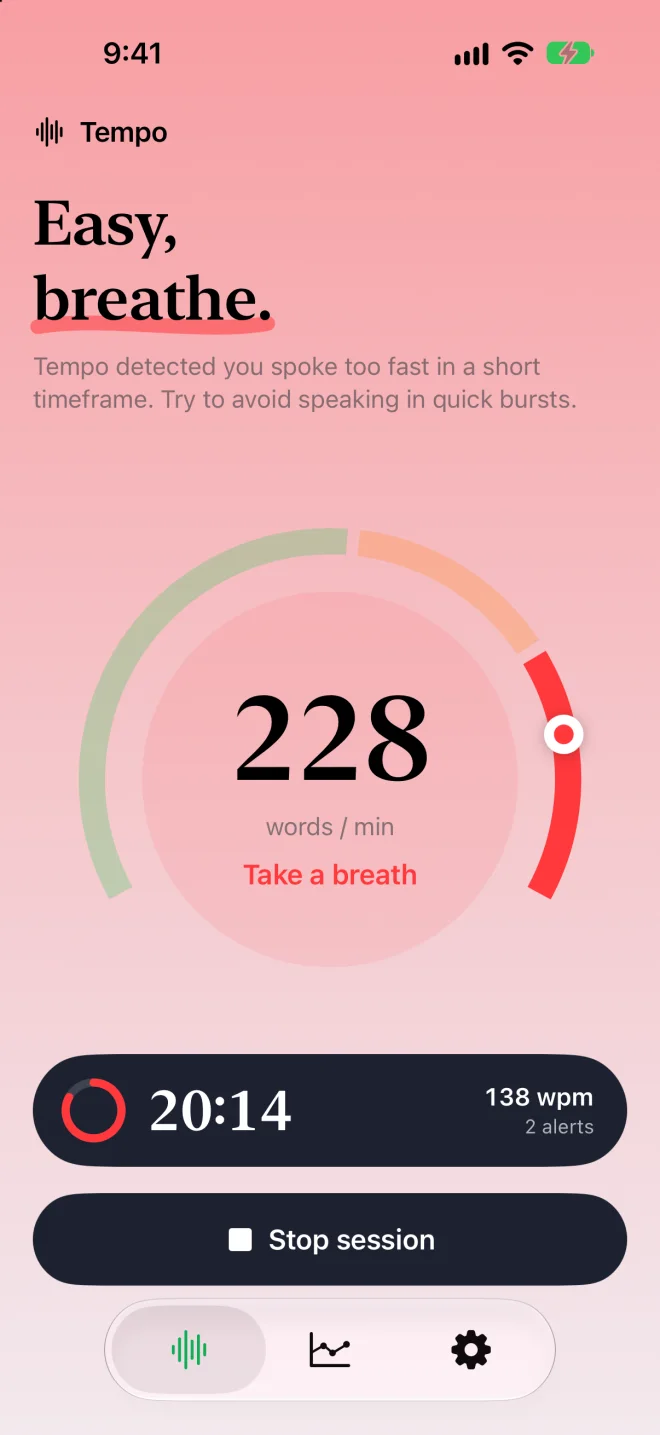
Easy, breathe.

Tempo watches for two things: short bursts where the words pile up, and an overall pace that keeps creeping higher. When either happens, you feel it right away and can slow down before the room notices.

  • Sound
  • Vibration
  • Notification
  • Live Activity
  • Watch tap
Tempo showing 228 words per minute in the red zone with the message Take a breath

Apple Watch

A tap on the wrist. Nobody else knows.

Leave the phone on the lectern. Your watch taps differently for a burst, for running fast, and for dragging, and you can start or stop from your wrist.

Rehearsal

Land on time, every time.

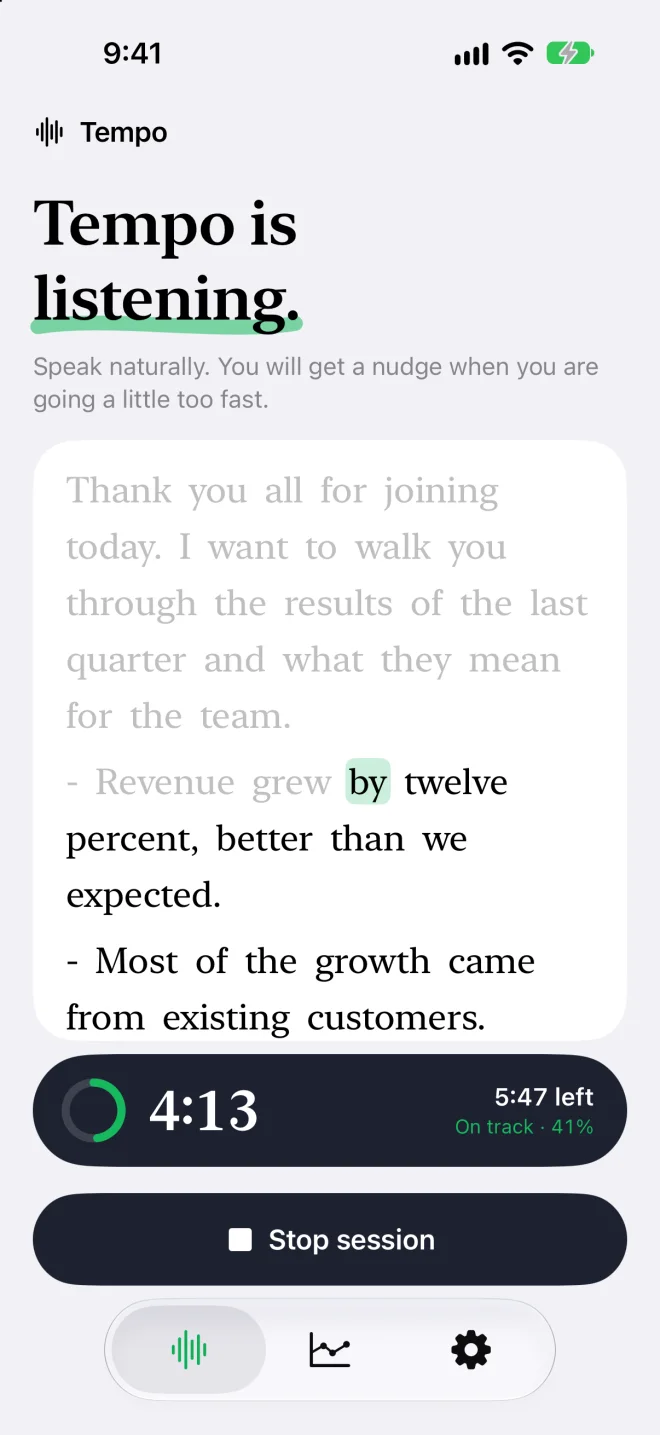
Paste your script and set a target. Tempo follows you word by word and tells you whether you are on track to finish when you planned.

Rehearsal mode following a script with 5:47 left and On track

Replay

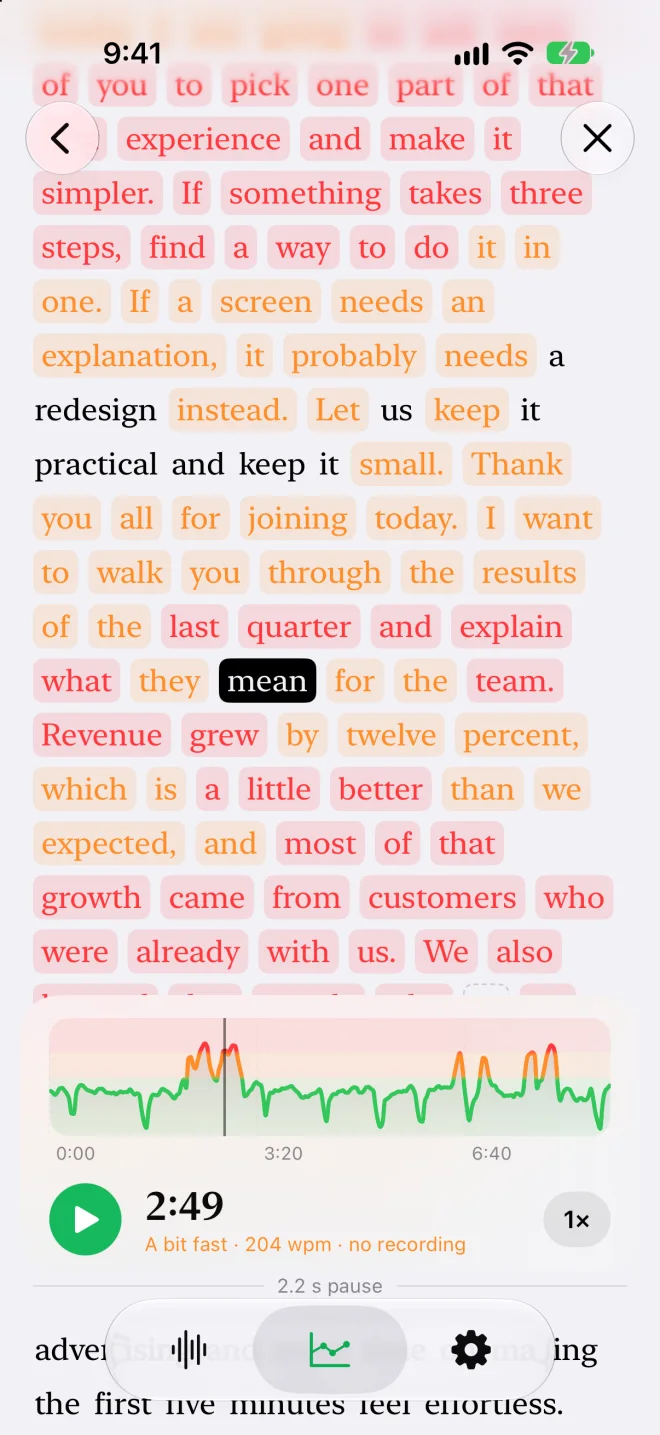
Every word, colored by pace.

Scrub through the talk and hear it again. Green was right, orange was a bit fast, red is where you lost them. Pauses are marked too.

Transcript with each word highlighted green, orange or red by speaking pace

Analysis

Know how it went.

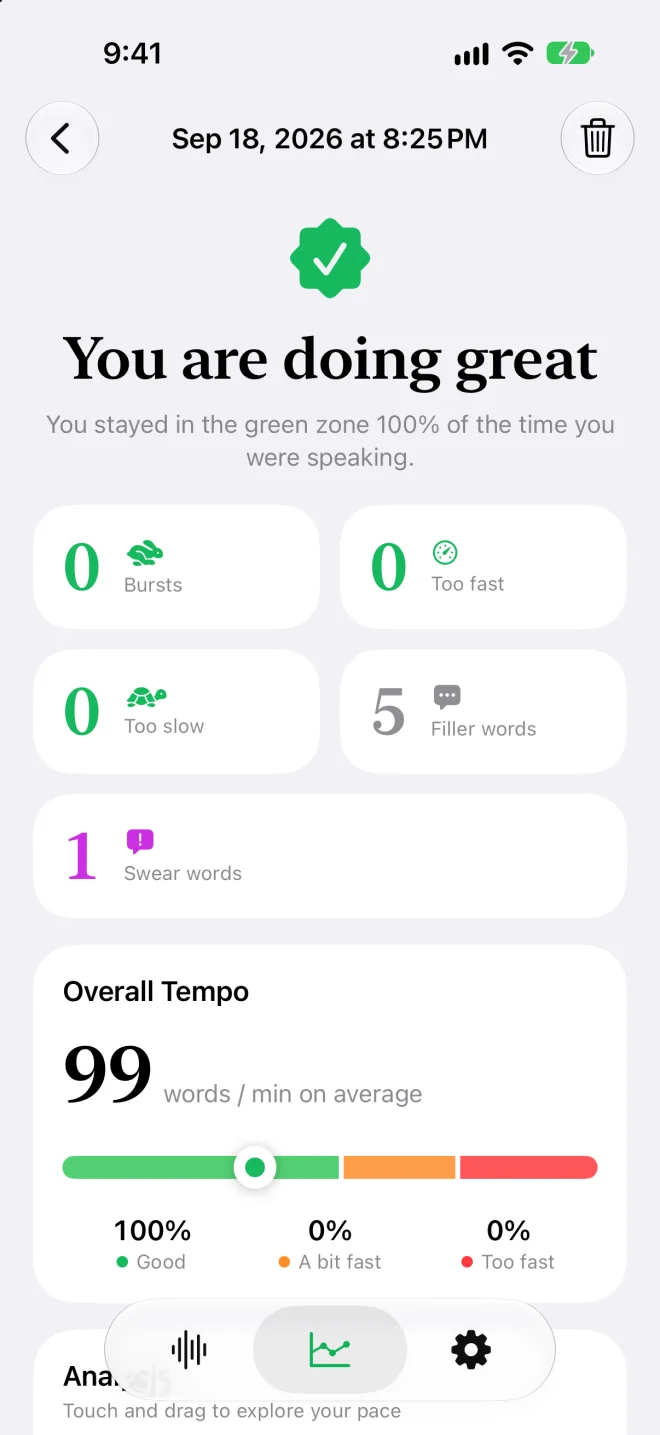
Bursts, time in the green zone, filler words, average pace. A clear verdict after each session, and trends over the last twelve weeks.

Session summary reading You are doing great with zero bursts and 99 words per minute

Practice

Five minutes, three steps.

A daily warm-up for your voice, then drills for the things that make a speaker easy to listen to: pace, pauses, volume and melody. Each one is scored live from your microphone.

14 slongest trill
+9semitones
6 daysstreak

Today's warm-up

  1. 1
    Lip trillsLoosen up, one breath at a time · 45 s
  2. 2
    Open throatVolume, for free · 1 min
  3. 3
    Over-articulationEvery syllable, exaggerated · 3 min
Start warm-up
Rate ladderThree speeds, on purpose.
The long pauseHold it longer than that.
ProjectionFill the room, not the throat.
MelodyMake the voice move.
Filler-free minuteSay it without the um.

The details

Small things that add up.

um

Filler words

Counts the ums, uhs and “you know”s, straight from the audio. English for now.

🐢

Too slow counts too

An optional nudge when you drag. Only while you are talking, never during a pause.

#!

Swear words

See if one slipped out, so it does not happen on stage.

↗

Trends

Twelve weeks of sessions, so you can see the habit change.

◐

Live Activity

Pace and timer on the Lock Screen and in the Dynamic Island.

Aa

Speech profiles

Naturally slow, neutral or fast. Tempo adapts its thresholds to you.

文

Your language

Works in every language Apple's speech recognition supports.

☁︎

iCloud sync

Your sessions follow you across devices through your own iCloud.

Privacy

Your voice stays yours.

No account and no Tempo servers. Speech is recognized by Apple's speech framework, on your iPhone wherever your language allows it. Transcripts sync through your private iCloud, and recordings never leave the device. You can switch both off.

Also on Mac

In the menu bar for every call.

Tempo for Mac sits beside Zoom, Teams, Meet, FaceTime or anything else that uses your microphone, and nudges you when you speed up in a meeting.

Get Tempo for Mac →

Why Tempo

I kept noticing too late.

This project started when I realized I often spoke too quickly in meetings and presentations, and only noticed after they ended.

When you are presenting, there is no room left in your head to watch your own pace. Tempo does that part for you and gives you a reminder in the moment, so you can adjust while it still counts.

Luca

Is Tempo free?

Tempo is free to download and try. Premium unlocks sessions of any length.

What if I naturally speak fast, or slow?

Pick a speech profile and Tempo shifts its thresholds to your natural speed, so you are only nudged when you are fast for you.

Which languages are supported?

Pace detection works in every language supported by Apple's speech recognition, which covers dozens of languages and regions. Filler word detection is English only for now.

Do I need an Apple Watch?

No. The iPhone nudges you with sound, vibration and notifications. The watch simply makes it more discreet.

Is my speech private?

Yes. Tempo has no account and no servers of its own. Transcripts live in your private iCloud and audio recordings stay on your device.

Tempo app icon

Slow down. They'll listen.

Download on the App Store